
Release date to UAT: May 23rd, 2022
Released to production: May 31st, 2022
Features and Enhancements
Bulk case closure and reassign
Users can now select multiple cases to either close or reassign by clicking each case or by selecting all cases using the "Select all visible" box at the top of the Cases view.
My Insights Dashboard - Coming Soon!
The new My Insights dashboard call attention to cases that need an adjuster's attention, and links them directly into the chats page. Reach out to your Customer Success Manager if you're interested in using this feature!
NOTE: The My Insights Dashboard is available to all organizations but will be enabled in production by the Hi Marley Team over time. For more details, please reach out to your Customer Success Manager.
New "My Inbox" Filtering
These filters can be accessed from the My Insights Dashboard (above) OR selected on the Chats page (below)
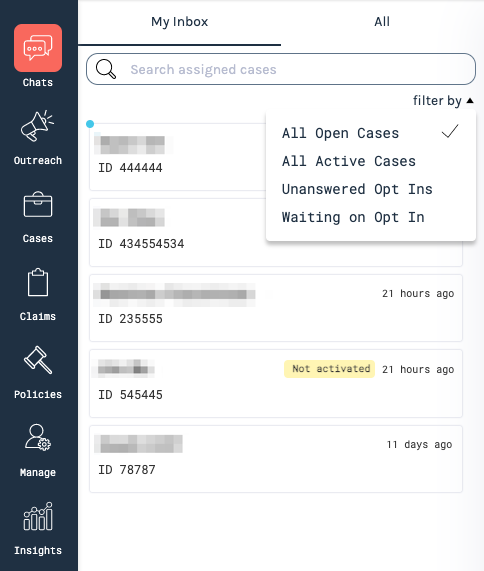
- All Open Cases will filter your Inbox to all open Cases (active or inactive)
- All Active Cases will filter your Inbox to Cases that have been activated/opted-on
- Unanswered Opt-Ins will filter your Inbox to opted-in Cases where you have not responded to the opt-in ("Yes").
- Waiting on Opt-In will filter your Inbox to all Cases that have yet to be activated/opted-in
Active status in header
You can now set yourself as "Away" and turn on your away message directly from the header on any page within Hi Marley using the dropdown next to your profile picture. You can also select "Edit away message" to jump directly into your away message and begin editing.
*You can only successfully set yourself as "Away" if you have an "Away Message" created/saved.
Character limit
Previously messages that were 1600 characters or more would fail without an indicator as to why those messages were failing. There is now a character counter in the lower right corner of the Chats view, which tells you how many characters are in your current message and doesn't allow you to add characters beyond that 1,599 character limit.
Bug Fixes
Schedule messages time selector saving issue
Scheduled messages would previously sometimes not save due to the time selected not saving. This has been resolved and you should now be able to schedule messages without needing to hit "Enter" after inputting the time.
Opted out users sporadically needing to be manually opted back in
In certain cases, policyholders who opted out would not be opted back in after responding with "Start" and then "Yes". This has been resolved and we don't expect this behavior to show any longer.
Message template sort order
Message templates previously weren't sorted on the Manage tab but now will be.
"No roles" showing in roles dropdown after creating a user
Briefly after creating a user, "No roles" would display instead of the expected roles list within the Manage tab. This should no longer be the case.
Comments
0 comments
Please sign in to leave a comment.